
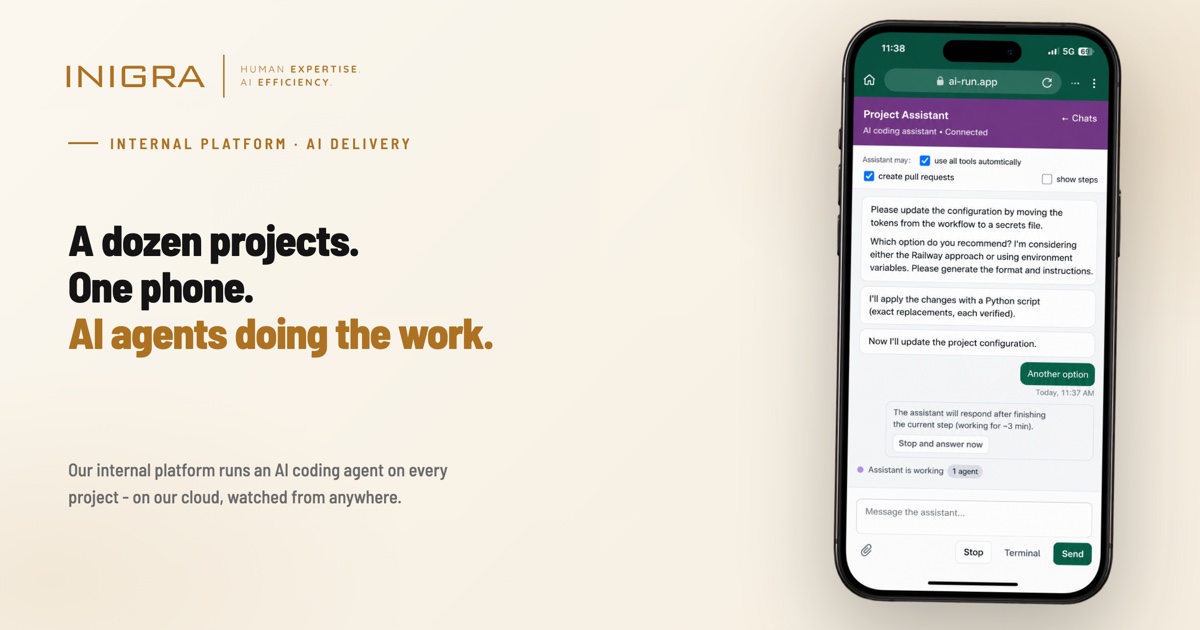
Inigra Projects is the platform we built to run our own work. On most of our projects a large share of the engineering now happens with AI coding agents - and this is where they run: on our cloud, on every project at once, watched and steered by the team from anywhere, including a phone.
It is also the clearest proof of how we actually work: Human Expertise × AI Efficiency. The AI does the heavy lifting; our engineers stay in control, review everything and own the result. Speed goes up - the judgment and the accountability stay human.
The Challenge: AI-Assisted Delivery That Outgrew the Laptop
We run a lot of projects at the same time, and on most of them AI coding agents now do a real share of the engineering. For a while those agent sessions lived in terminal windows on one laptop. That set-up hit a wall fast:
- Close the laptop and the work stopped. A long task - a refactor, a test run, a release build - needed the machine awake and online.
- You could not check on anything away from the desk. "Is it done yet?" meant walking back to the computer.
- A dozen sessions in a dozen windows is not a system. It was easy to lose track of which one needed an answer and which was still working.
- One machine ran out of room. Many projects, test databases and several agents at once do not fit on a single laptop.
We wanted the work to keep running somewhere reliable, and one place to see and talk to all of it.
What We Built: One Home for Every Project's AI Work
Inigra Projects gives every project a status, a task list, a dated log and an inbox - and, at its heart, a chat with its own AI coding agent (we build on Claude Code). The difference that matters: those agents run on our own cloud, not on anyone's laptop. Start a task, close your screen, and it keeps going.
From one dashboard the team sees every project at a glance: which are working, which are waiting for a decision, and what each agent is doing right now.
Run It From Your Phone
This is the part we use most. The whole platform works as an app on a phone, so the office is wherever you are. On a normal day you can:
- See which projects need an answer and which are still working.
- Reply to an agent or send a new instruction - and talk to it while it works, not only when it stops.
- Start a task on one project, check another, and pause a third.
- Get a short progress line from each session, so nothing runs silently for an hour.
The laptop becomes just a bigger screen, not a requirement.
Guardrails, Because It's Client Code
Running AI agents on real client projects only works if it is safe by default, so safety is built into the platform rather than left to good intentions:
- Every project sets what its agent is allowed to do, and the riskiest actions are blocked outright.
- Credentials are kept encrypted and never exposed in the chat.
- A person reviews and approves changes - nothing of consequence ships unseen.
The point is simple: the AI can move fast, but it never acts unchecked on a client's code.
Oversight, Not Autopilot
None of this replaces our engineers - it amplifies them. The agent takes on the repetitive, time-consuming work; the engineer stays in the loop to decide, review and own the result. The whole platform is built around that balance - full visibility, easy course-correction, and a person responsible for every project.
Human Expertise × AI Efficiency. A person decides, reviews and signs off on every change. The AI makes them faster - it never replaces the judgment or the accountability.
What It Changes for Our Clients
We did not build this to show off - we built it because it makes the work better for the people who hire us:
Why Not Just Use an Off-the-Shelf Tool?
Plenty of tools now let you reach an AI coding agent from a phone - we looked hard before building our own. In practice they fall into two camps, and neither fit how we needed to work.
1. Remote-control your own machine. Claude Code's Remote Control, Cursor's Remote Control and the classic SSH + tmux setup all turn the phone into a remote for a session that actually runs on a computer. That computer has to stay awake, online and keep the process alive - the phone cannot wake it or restart it, and Cursor's own docs note that every terminal command, edit, test and git action runs on your machine. Close the laptop and the work stops - exactly the bottleneck we were trying to escape.
2. Managed cloud agents. Options like Claude Code on the web and Cursor's cloud agents do remove the laptop - the work runs on the provider's cloud. But they are built around a single Git repository and branch, can require a Git remote and cloud storage to be enabled, and sessions can expire. They are made to run one task, not to keep a whole portfolio of client projects moving, each with its own full toolchain, accounts and guardrails.
What we needed was the cloud camp's "no laptop required" together with the local camp's full, do-anything terminal - across every client at once, under our own guardrails, and driven from a phone exactly like sitting at the desk. No off-the-shelf tool did all of that when we looked, so we built Inigra Projects.
Why We Build Our Own Tools
We think a software house should use the tools it believes in - on itself, first. Inigra Projects is us doing exactly that: taking AI seriously enough to engineer the platform that lets us deliver with it at scale, safely, across every client we work with.
About Inigra Software House. We are a Polish software house specialising in AI integration, web, mobile and custom software, and cloud architecture - built by an expert team. We help businesses turn modern technology into tools that genuinely move their work forward.
Frequently Asked Questions
Does Inigra use AI to write our software?
Yes. Our engineers work alongside AI coding agents on most projects - the agent handles the heavy lifting while a person reviews, decides and owns every change. It is Human Expertise multiplied by AI Efficiency: faster delivery, with someone accountable for the result.
Is my code safe if AI agents work on it?
Yes. Every session runs with guardrails - scoped permissions, encrypted credentials, the riskiest actions blocked, and a human reviewing changes before anything ships. We built the platform specifically so AI can move fast without ever acting unchecked on client code.
Does using AI mean lower-quality work?
No - the opposite. AI removes the repetitive work so our engineers spend their time on architecture, judgment and review. Every change is still written, tested and approved to the same standard; the AI just gets us there faster.
Can you really run many client projects at the same time?
Yes - that is exactly what Inigra Projects is for. It keeps an AI coding agent working across many projects in parallel, on our own cloud, with the team watching and steering each one from anywhere, including a phone.
What does this mean for my project's timeline and cost?
Work continues even when no one is at a desk, and routine tasks finish faster - so you get quicker turnarounds and more momentum for the same budget, without a laptop or a single person becoming the bottleneck.