Category: Blog – Inigra Software House

  • Three Types of Founders Walk Through Our Door. Only One Doesn’t Pay Twice.

    Three Types of Founders Walk Through Our Door. Only One Doesn’t Pay Twice.

    After reviewing over 50 AI-built codebases this year, a pattern has emerged. Every founder who walks through our door falls into one of three categories. Each one teaches the same lesson – but at very different price points.

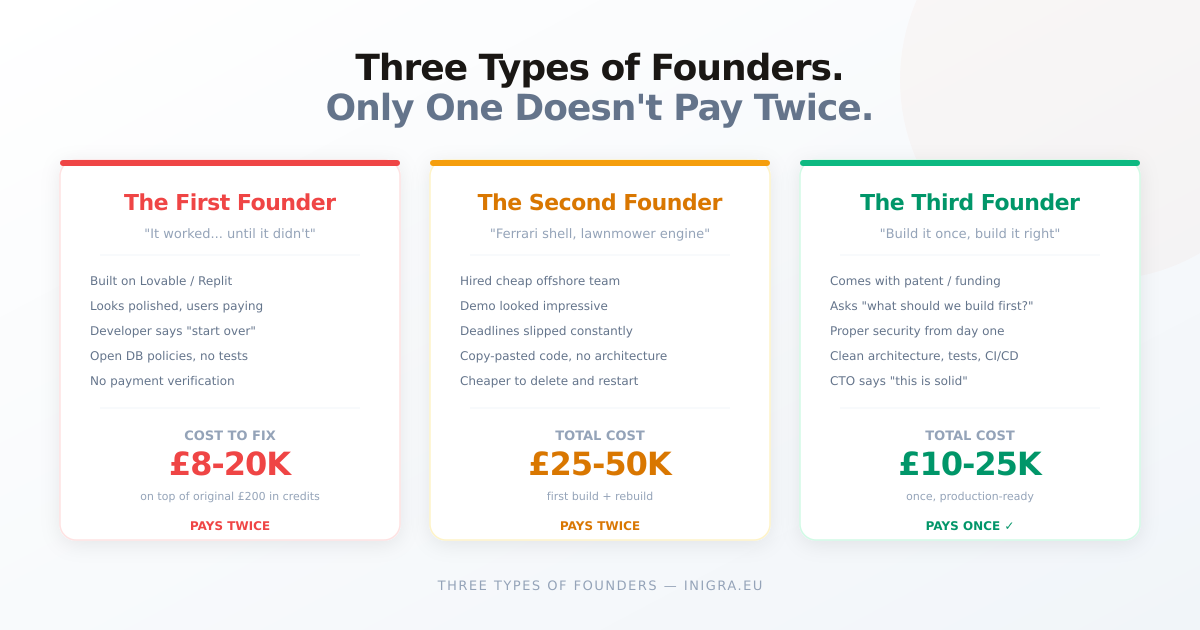
    The first founder

    They built an MVP on Lovable or Replit. It worked. Users signed up. Revenue started coming in. The UI was polished, the features were solid, and by every visible measure the product was ready to scale.

    Then they tried to hire a developer. The developer opened the codebase, spent two hours reading it, and said: “I’d rather start over than maintain this.”

    The founder thinks the developer is being dramatic. The developer is not being dramatic.

    What we find when we audit these codebases is always the same: database security policies wide open, no payment verification on Stripe webhooks, every API endpoint accepting requests from any website on the internet, credentials hardcoded in the source, and zero tests for the entire application. The AI built what the founder asked for. It didn’t build what the founder didn’t know to ask for.

    The rescue costs more than the original build. Always. Because now they’re paying to understand what exists, undo what’s broken, and rebuild what should have been done right from the start – all while keeping a live product running for paying users.

    The second founder

    They chased a low hourly rate. Found a team quoting $15-20/hr. The proposal looked good. The timeline was aggressive. The first demo was impressive.

    Then things started slipping. Deadlines moved. Features that “worked” in the demo broke in production. Bug fixes introduced new bugs. The codebase grew but the product didn’t improve. Communication became a game of managing expectations rather than building software.

    When we open these codebases, we find something that looks like a Ferrari on the outside but has a lawnmower engine inside. The architecture doesn’t support the features. The code is copy-pasted across files with slight variations. There’s no consistent error handling, no logging, no deployment pipeline. It’s cheaper to delete the repo and start over than to fix what’s there.

    The second founder ends up paying twice: once for the version that doesn’t work, and once for the version that does.

    The third founder

    They come to us first. They have a patent, or a validated idea, or an angel investor. They’ve done their homework. They know that building software is an investment, not an expense, and they want it done right the first time.

    They don’t ask “how cheap can you build this?” They ask “what should we build first, and how do we make sure it’s production-ready?”

    These founders get the same senior engineers and the same AI-assisted development tools as everyone else. The difference is that everything is built with intention from day one: proper security policies, payment verification, test coverage, clean architecture, and zero vendor lock-in. When they hire a CTO six months later, the CTO opens the repo and says “this is solid – let’s build on it.”

    The strategic founder typically spends less than the first two combined.

    The numbers

    Here’s what we see across our projects:

    The first founder pays £8,000-20,000 to fix and migrate an AI-built codebase that originally cost £200 in platform credits.

    The second founder pays £15,000-30,000 for a proper rebuild after spending £10,000-20,000 on the version that didn’t work. Total cost: £25,000-50,000.

    The third founder pays £10,000-25,000 once, for a production-ready product they own completely.

    What changed in 2026

    Two years ago, building an MVP with a senior development team cost £30,000-50,000 and took 4-6 months. The “build it cheap” approach made economic sense even with the risks, because the alternative was genuinely expensive.

    In 2026, senior developers using AI-assisted coding tools deliver 2-3x faster than they did in 2024. A production-ready MVP that would have cost £40,000 two years ago now costs £10,000-20,000 and ships in 6-8 weeks. The gap between “cheap and risky” and “proper and reliable” has collapsed.

    The strategic approach is no longer the expensive option. It’s the only option that makes financial sense.

    Which founder are you?

    If you’re already the first or second founder, it’s not too late. A codebase audit takes 2-3 days and tells you exactly what you have, what needs fixing, and what it costs. Sometimes the news is better than expected. Sometimes it confirms what you already suspected. Either way, you stop guessing and start making informed decisions.

    If you haven’t started building yet, you have the chance to be the third founder. Come to us with your idea, your validation, and your budget. We’ll tell you honestly what to build first and what to leave for later.

    We’re a senior EU-based team. Google Cloud Partner. 5.0 on Clutch. MVPs from £10,000.

    Book a free discovery call. No pressure, no pitch. Just a straight answer about what it would take to build your product right.


    We build MVPs and rescue AI-built apps at Inigra. If you want to see what we find inside AI-generated codebases, read our 600K line audit.

  • AI is Already Managing Ad Campaigns. But You Shouldn’t Need an Engineering Degree to Set It Up.

    AI is Already Managing Ad Campaigns. But You Shouldn’t Need an Engineering Degree to Set It Up.

    There’s a thread on r/PPC right now with 170+ upvotes. The title: “My experience using Claude to actually manage Google Ads.” Not summarise. Not report. Manage – as in pausing keywords, adjusting bids, restructuring campaigns, writing new ad copy.

    The comments are even more telling. Agency owners sharing their setups: Claude Code connected to BigQuery, Notion for task approval, custom MCP servers for API access, skills files encoding their entire playbook. One commenter manages 118 Google Ads accounts this way. Another runs scheduled morning analysis agents that send Slack summaries before the team wakes up.

    The consensus? AI-powered ad management isn’t coming. It’s here. But the current approach has a problem.

    The DIY tax

    Every setup described in that thread is custom-built. Getting Google Ads API access alone takes some people 3 weeks. Then you need a Google Cloud project, a developer token, a self-hosted MCP server, a data pipeline to BigQuery, a context system in Notion or Markdown files, and a set of hand-written skills to tell the model what to do.

    It works. The results people report are genuinely impressive. But the barrier to entry is software engineering, not marketing.

    And here’s the thing – almost all of it is focused on Google Ads. Meta Ads (Facebook + Instagram) barely gets mentioned, despite being the primary channel for thousands of agencies, e-commerce brands, and lead generation businesses.

    That’s why we built Mads.

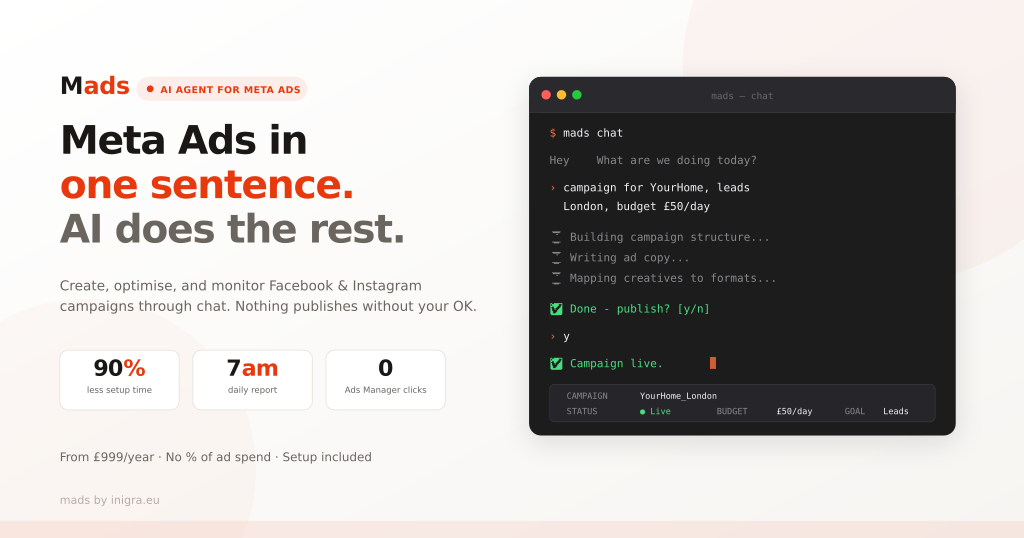
    Mads is an AI agent for Meta Ads that does what those DIY setups do – but without the engineering. No API tokens. No BigQuery. No MCP configuration. You open a chat, describe your campaign in plain English, and Mads handles the rest.

    > campaign for YourHome, leads, London, budget £50/day
    
    ⏳ Building campaign structure...
    ⏳ Writing ad copy...
    ⏳ Mapping creatives to formats...
    
    ✅ Done - publish? [y/n]
    > y
    ✅ Campaign live.

    Four lines. Campaign is live on Facebook and Instagram.

    The “human at the helm” problem – solved by design

    The top-voted comment in that Reddit thread (47 upvotes) says: “Claude should be used as an analyst, not as a buyer. There should always be a human at the helm approving any changes.”

    We agree. That’s why Mads shows you everything before it publishes – campaign structure, targeting, every ad copy field, creative mapping – as a plain-text preview. You review it, edit anything you want, and only then approve. Nothing goes live without your explicit OK.

    This isn’t a black box that spends your money while you sleep. It’s a very fast, very thorough assistant that does the grunt work and waits for your green light.

    What Mads actually handles

    Full campaign creation from a sentence. You give it a client name, goal, location, and budget. Mads creates the campaign structure, picks targeting (broad, lookalike, retargeting), and maps your creatives to Feed, Stories, and Reels automatically.

    Every ad copy field, not just the headline. Meta Ads have a dozen text fields per ad. Primary text, headline (with A/B variants), description, CTA button, display URL, destination link. Mads generates all of them, tuned to the campaign goal and client context.

    Morning reports at 7am. Every day, across all connected accounts. Leads, cost-per-lead, what’s working, what’s not. One of the most-praised features in the Reddit thread was exactly this – scheduled analysis that arrives before you open your laptop. Mads does it out of the box.

    Proactive alerts. Campaign rejected by Meta? Budget burning too fast? Cost-per-lead spiking? Mads notifies you and suggests a fix. No more “just checking” sessions in Ads Manager.

    Auto-optimisation with guardrails. Set a cost-per-lead threshold. When performance is strong, Mads scales the budget. When it’s not, it flags the issue for you. You define the rules – the agent executes them.

    E-commerce catalog campaigns. For WooCommerce, Shopify, and PrestaShop stores – Mads syncs your product feed via the Meta Catalog API and runs dynamic product ads, abandoned-cart remarketing, and Advantage+ Shopping campaigns. Automatically.

    Who is Mads for?

    The Reddit thread identified two groups where AI ad management makes the most impact. We’d add a third.

    Marketing agencies – the thread’s most compelling insight is about agency economics. Smaller accounts that were never worth deep manual work suddenly become profitable when AI handles the execution. One operator with Mads can manage campaigns across all client accounts, with consistent quality across the board. No more output depending on “whichever AM happens to be sharp that week.”

    Freelance marketers and consultants – if you already know how Meta Ads work, Mads is leverage. You focus on strategy and client relationships. Mads handles the 45-minute campaign setup routine, the daily monitoring, and the reporting.

    E-commerce store owners – you don’t need to learn Ads Manager or hire an agency. Describe what you sell, point Mads at your product feed, and let it run your Meta campaigns. You still approve everything before it goes live.

    Pricing

    Annual licence. No percentage of ad spend. No hidden fees.

    • Starter (1 Meta Ads account) – £999/year
    • Pro (up to 5 accounts) – £1,899/year
    • Agency (unlimited accounts) – £2,899/year

    Setup and configuration included in every plan.

    To put that in context – the Reddit thread discusses agency setups that took weeks of engineering time to build and require ongoing maintenance. Mads is ready to go from day one.

    See it in action

    We’re running 30-minute demo calls. We’ll walk you through a real campaign – from one sentence to live ads. No commitment, no sales pressure.

    Book a demo call →

  • Lovable Just Proved Everything We Found in Our 600K Line Audit

    Lovable Just Proved Everything We Found in Our 600K Line Audit

    Last week, we published an article about a production SaaS built entirely on Lovable – 600,000 lines of AI-generated code with security gaps the founder never knew existed. The article hit 250,000 views on Reddit and 19,000 impressions on LinkedIn.

    This week, Lovable proved every finding right.

    What happened

    On April 20, security researcher @weezerOSINT created a free Lovable account, made five API calls, and accessed another user’s source code, database credentials, AI chat histories, and customer data. No hacking required. No exploits. Just a free account and basic API requests.

    The vulnerability – a Broken Object Level Authorization (BOLA) flaw, ranked number one on OWASP’s API Security Top 10 – affected every project created before November 2025. The researcher extracted real names, real companies, real LinkedIn profiles from a Danish nonprofit’s project. Database credentials. Stripe keys. Full AI conversations where founders had pasted error logs, discussed business logic, and shared passwords with the AI assistant.

    Companies including Uber, Zendesk, and Deutsche Telekom use Lovable, according to its latest funding announcement. If employees at these companies used Lovable for internal tools or prototypes before November 2025, sensitive corporate data may have been exposed.

    The researcher reported this to Lovable through HackerOne on March 3. Lovable closed the report without escalation. The vulnerability stayed open for 48 days.

    When the researcher went public, Lovable’s response cycled through three stages in a single day: first they denied a breach and called it “intentional behavior,” then blamed unclear documentation, then shifted responsibility to HackerOne for not escalating the report.

    The platform made it worse

    Early free-tier users on Lovable couldn’t create private projects at all. They had to upgrade to a paid plan to make their projects private. Every free-tier project was public by default – including code, AI chat history, and any credentials discussed in conversation.

    Lovable switched to private by default in December 2025. But in February 2026, while updating backend permissions, they accidentally re-enabled access to chats on public projects. The March 3 bug report flagged exactly this. It was closed without action.

    When Lovable finally patched the issue, they only fixed new projects. Older projects – potentially thousands of them, many still active – remained exposed. A newly created project correctly returned “403 Forbidden” when queried. An older project returned “200 OK” with full access to everything.

    Why this matters if you built on Lovable

    This is not a theoretical risk. If you built an app on Lovable before November 2025, assume the following has been publicly accessible:

    • Your full source code
    • Every message you sent to the AI, including any credentials you pasted
    • Your database schema and connection strings
    • Your Supabase, Stripe, and third-party API keys embedded in the code
    • Your users’ data if the AI helped you build database tables with personal information

    As the researcher put it: “People tell the AI what they want to build. They paste error logs. They discuss their business logic. They share credentials. Lovable stores all of it and exposes all of it.”

    What we already found – and what just got confirmed

    We found: Every AI function routed through Lovable’s proprietary gateway.
    The breach confirms: Your entire project – code, conversations, credentials – lives on infrastructure you don’t control. When that infrastructure has a security flaw, you have no visibility and no ability to respond.

    We found: Passwords stored in plain text with TODO comments to fix later.
    The breach confirms: Founders share credentials with the AI during development. Those conversations were stored and exposed. Every password, API key, and database connection string discussed in chat was readable by any free account.

    We found: RLS policies wide open for months before a fix migration.
    The breach confirms: Lovable’s own authorization was broken for 48 days after being reported. The platform responsible for generating your security policies couldn’t secure its own API endpoints.

    We found: No tests, no verification, no safety net.
    The breach confirms: There was no automated system catching unauthorized access to user data. The vulnerability was found by a single external researcher, not by Lovable’s own security testing.

    The bigger picture

    The data across the entire AI coding category is consistent. Between 40% and 62% of AI-generated code contains security vulnerabilities, depending on the study. AI-written code produces flaws at 2.74 times the rate of human-written code. A Q1 2026 assessment of over 200 vibe-coded applications found that 91.5% contained at least one vulnerability traceable to AI hallucination.

    Lovable is not uniquely insecure. It is representatively insecure. The same patterns exist across every AI coding platform. The same incentive structure applies: growth is rewarded, security is an afterthought. Lovable hit $4 million ARR in four weeks, raised $330 million at a $6.6 billion valuation, and grew enterprise adoption by 340% year over year. That kind of growth doesn’t leave room for the slow, careful security work that production software requires.

    87% of Fortune 500 companies have adopted at least one vibe coding platform. Financial services and healthcare show the lowest adoption at 34% and 28% respectively – which suggests the market itself recognises the risk, even if individual founders don’t.

    What to do right now

    If you built on Lovable before November 2025:

    1. Assume your source code and AI chat history have been read by unknown parties. Act accordingly.
    2. Rotate every credential that was ever mentioned in a Lovable chat – Supabase keys, Stripe keys, database passwords, API tokens. All of them. Today.
    3. Check whether your Supabase database contains user data that was exposed through the source code. If your connection strings were leaked, your database may have been accessed directly.
    4. Set all projects to private immediately.
    5. If you have paying users, consider whether you need to notify them.

    If you’re still building on any AI platform:

    1. Never paste credentials into AI chat. Use environment variables and reference them by name, not value.
    2. Assume your AI conversations are stored and potentially accessible. Treat every message as if it could be read by a stranger.
    3. Get your code into your own GitHub repository. Don’t rely solely on the platform’s storage.
    4. Get an independent security review before going to production. The platform that wrote the code cannot objectively audit it – and as this breach shows, the platform itself may not be secure.

    If you have paying users on an AI-built app:

    You have a responsibility to your users. Their data may have been exposed not through your code, but through the platform you built on. Consider what steps you need to take to secure their information going forward.

    The pattern continues

    We said it in our original audit and it bears repeating: AI is consistently good at the visible – UI, features, user flows. And consistently weak at the invisible – security, testing, architecture, vendor dependencies.

    This week, the invisible became visible. The question for every founder building on these platforms is not whether the same issues exist in your codebase. They almost certainly do. The question is whether you discover them through a planned review or through an incident.

    One of those options is significantly cheaper than the other.

    Source: https://thenextweb.com/news/lovable-vibe-coding-security-crisis-exposed


    We audit AI-generated codebases and migrate apps off Lovable, Replit, and Bolt to production infrastructure. If you want to know what’s in your code before someone else finds out, book a free discovery call.

  • 600,000 Lines of AI-Generated Code: What We Found Inside a Production SaaS

    600,000 Lines of AI-Generated Code: What We Found Inside a Production SaaS

    We recently reviewed a codebase that was built almost entirely by AI. Not a prototype. Not a side project. A live, paying SaaS platform with real users, Stripe billing, and an enterprise feature set.

    The numbers are staggering:

    • Over 600,000 lines of TypeScript
    • Over 25,000 GitHub commits
    • Nearly 16,000 messages to the AI builder
    • Over 8,000 AI-generated edits
    • 100+ database tables
    • 100+ serverless functions
    • 500+ database migrations
    • Built in under 6 months by a solo non-technical founder

    By any measure, this is an impressive achievement. A single person with no coding background built a production SaaS platform that would have taken a traditional development team 12-18 months and six figures in budget. The UI is polished. The feature set is comprehensive. Users are signing up and paying.

    But then we looked under the hood.

    The platform dependency nobody talks about

    The biggest issue wasn’t a bug. It wasn’t a missing feature. It was architecture.

    The platform relies heavily on AI-powered features – they’re the core product, not a nice-to-have. Content generation, analysis, translation, recommendations – all powered by AI. In total, over 30 serverless functions handle AI operations.

    Every single one of them routes through the no-code platform’s proprietary AI gateway.

    Not OpenAI directly. Not Anthropic. Not any API the founder controls. A gateway URL owned and operated by the platform the app was built on.

    This means:

    • If the founder ever wants to leave the no-code platform, all 30+ AI features break instantly
    • The founder has no control over which AI models are used, what rate limits apply, or what the per-request cost is
    • The no-code platform can change pricing, throttle access, or shut down the gateway at any time
    • There is no fallback. Zero direct API calls exist anywhere in the codebase

    The founder built an entire business on top of infrastructure they don’t control and can’t replicate. The AI features ARE the product – without them, the platform is an empty shell. That’s not a technical limitation. That’s a business risk most founders don’t know they’re carrying.

    Security: the patterns AI always leaves behind

    We’ve now reviewed dozens of AI-generated codebases. The same patterns show up every single time. This project was no different.

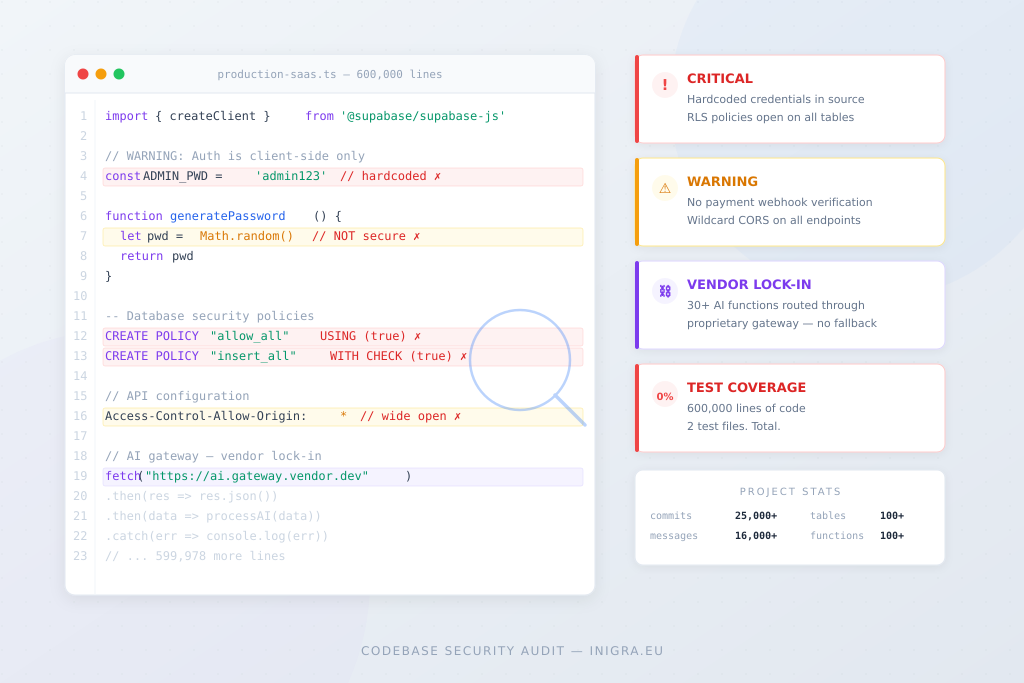
    Passwords generated with Math.random()

    Two separate functions generate temporary passwords for new users using JavaScript’s Math.random(). This is not cryptographically secure – the output is predictable and can be reproduced. The fix is one line (crypto.getRandomValues()), but the AI chose the simpler option every time.

    Row-level security that started wide open

    The database had RLS enabled across the board with nearly 500 security policies – impressive numbers. But for the first two months of the project, critical tables had policies set to USING (true), meaning any authenticated user could read, modify, or delete any row in those tables. The AI eventually generated a security fix migration, but the platform was live with open policies for weeks before that happened.

    Wildcard CORS on every endpoint

    Every single serverless function uses Access-Control-Allow-Origin: *. This means any website on the internet can make requests to the platform’s API endpoints. For a SaaS handling user data and processing payments, this should be locked down to the platform’s own domain.

    No payment webhook verification

    The platform charges users via Stripe. It has a checkout flow and a customer portal. But there is no Stripe webhook handler to verify that payments actually completed. The credit system resets monthly on a scheduled cron job based on a date stored in the database – regardless of whether Stripe successfully collected the payment. If a card declines, the user could still receive their monthly credits.

    The testing gap

    The project has over 600,000 lines of code and 2 test files.

    Two.

    One tests accessibility. One tests a styling utility function. There are zero tests for:

    • Authentication flows
    • Payment processing
    • Credit deduction logic
    • Any of the 100+ serverless functions
    • Database operations
    • User permissions and role-based access

    This isn’t unusual for AI-generated code. The AI builds features when you ask for features. It doesn’t write tests unless you specifically ask for tests. And most non-technical founders don’t know to ask.

    Performance: death by fonts

    The app loads 11 Google Font families on every single page. That’s roughly 500KB of font files before any content renders. Most pages use one or two of these fonts. The rest are loaded and never used.

    This is a classic AI pattern – the founder asked for a font change at some point, the AI added it, and the previous font imports were never removed. Multiply this by hundreds of iterations and you get a bloated page load.

    The 3,000-line function

    One serverless function is over 3,000 lines long. Another exceeds 1,500 lines. A well-structured function is typically 50-200 lines. These are unmaintainable by any developer – human or AI.

    The AI doesn’t refactor. It adds. When a function needs new capability, the AI appends code rather than restructuring. Over thousands of iterations, functions grow into monoliths that no one can safely modify without breaking something else.

    What the AI got right

    It would be dishonest to only talk about what went wrong. The AI built genuinely impressive things:

    • A complete multi-role authentication system with session management and audit logging
    • A sophisticated credit-based billing model with organisation-level pooling
    • Comprehensive RBAC (role-based access control) with granular permissions
    • A security fix migration that identified and replaced overly permissive RLS policies
    • Clean component architecture with proper separation of concerns
    • Over 120 custom React hooks for data fetching and state management
    • Full internationalisation support

    The founder built a platform that competes with established products that took years and millions to develop. That’s real. The AI made it possible.

    The uncomfortable truth

    The problem isn’t that AI-generated code is bad. Much of it is good. The problem is that AI-generated code is consistently good at the things that are visible (UI, features, user flows) and consistently weak at the things that are invisible (security, performance, testing, architecture decisions, vendor dependencies).

    A founder looking at their working app sees a product ready to scale. A developer looking at the same codebase sees a list of things that will break under pressure.

    The 600,000 lines work today. The question is whether they’ll work when:

    • A security researcher finds the wildcard CORS
    • A card payment fails and credits still reset
    • The no-code platform changes its AI gateway pricing
    • A user discovers they can access another user’s data through a stale RLS policy
    • The 3,000-line function needs a bug fix and changing one line breaks three features

    None of these are hypothetical. We’ve seen every one of them happen in production.

    What to do about it

    If you’ve built your product on a no-code platform with AI, here’s what we’d recommend:

    Right now (free, takes an hour):

    1. Connect your project to GitHub if you haven’t already
    2. Search your codebase for Math.random in any security context – replace with crypto.getRandomValues()
    3. Check your database policies – search for USING (true) and understand which tables are wide open
    4. Check if your serverless functions use wildcard CORS – lock it down to your domain

    Before you scale:

    1. Get an independent security review. Not from the AI that wrote the code – from a human who understands what to look for
    2. Verify your payment flow end-to-end. Does a failed payment actually prevent access?
    3. Identify your platform dependencies. Can you leave your current provider without losing core features?
    4. Add tests for your critical paths: authentication, payments, and any function that touches user data

    Before you raise funding or sell:

    1. Any technical due diligence will find these issues. Better to fix them before investors or buyers look under the hood
    2. A codebase audit typically costs a fraction of what the findings would cost you if discovered in production

    The AI got you to market. That’s the hard part. Now it’s time to make sure what you built can survive contact with the real world.


    We audit AI-generated codebases every week. If you want to know what’s in yours before your users find out, we offer free security reviews for projects built on Lovable, Replit, Base44, and Bolt. Details at inigra.eu/nocodemigration

  • The No-Code Credit Trap: How AI Builders Are Quietly Draining Your Budget

    The No-Code Credit Trap: How AI Builders Are Quietly Draining Your Budget

    The loop nobody warns you about

    You started with a simple idea. A quick prototype. Maybe a SaaS tool, a marketplace, or an internal dashboard. You picked Lovable, Replit, or Bolt because they promised speed. Build an app in a weekend. Ship fast. No developers needed.

    And it worked — at first.

    Here’s the pattern we see with every founder who comes to us after the no-code phase:

    You hit a bug. You ask the AI to fix it. It uses a credit. The fix breaks something else. You ask it to fix that. Another credit. The second fix partially works but introduces a new issue. Three more credits later, you’re back where you started – except your balance is lighter.

    This isn’t a flaw in how you’re using the tool. It’s how these tools are designed to make money.

    Credit-based pricing means you pay for every attempt, not every result. The AI doesn’t know what it built yesterday. It doesn’t learn from its mistakes on your project. Every prompt is a fresh start with the same chance of hallucinating a solution that looks right but breaks under real usage.

    We’ve seen founders burn through £200–500 in credits fixing a single authentication flow that a developer would handle in a few hours.

    The hidden costs beyond credits

    Credits are the obvious cost. The hidden costs are worse.

    Time. Every cycle of prompt → generate → test → fail → reprompt is 15–30 minutes. Do that ten times for one feature and you’ve lost a full day. Multiply by every feature in your app.

    Technical debt. AI-generated code accumulates workarounds on top of workarounds. Each fix is a patch on a patch. After a few months, your codebase is a Jenga tower — functional, but one change away from collapse.

    Security. We’ve audited dozens of AI-built apps. The pattern is always the same: hardcoded API keys in the frontend, no security headers, cookies without HttpOnly flags, exposed server information. One security researcher scanned 200+ vibe-coded sites and found an average security score of 52 out of 100. The AI builds what you ask for. It never thinks about what you didn’t ask for.

    Scaling costs. Most platforms charge by operations, rows, or compute. What costs £50/month with 10 test users becomes £500 with 1,000 real users. By the time you notice, you’re locked in – your entire app lives on their platform, and migrating means rebuilding.

    When no-code makes sense

    This isn’t an anti-no-code article. These tools are genuinely powerful for the right use case.

    Validation. If you haven’t proven that people will pay for your product, no-code is the fastest way to find out. Build ugly, ship fast, get feedback. Don’t spend £15K on custom development for an idea nobody wants.

    Internal tools. A simple dashboard, a form that feeds a database, a basic CRUD app for a small team. No-code handles these well because the requirements are stable and the user base is small.

    Prototyping. Building something to show investors or test a UX flow? No-code gives you a clickable product in days. That prototype becomes your best spec document when you eventually hire developers.

    The problem isn’t using no-code. The problem is staying on no-code past the point where it’s serving you.

    The signs you’re in the trap

    You’re in the credit trap if any of these sound familiar:

    Your credit spend is unpredictable. You budget £100/month but some months hit £400 because of a cascade of fixes. You can’t forecast costs because you can’t predict how many attempts the AI will need.

    Workarounds outnumber features. You’ve added Zapier chains, hidden fields, webhook relays, and custom CSS hacks to make basic things work. Your “no-code” app now has more duct tape than logic.

    You’re afraid to change things. Every new feature risks breaking something else. You’ve stopped iterating because the cost of change — in credits and time — is too high. That’s the opposite of what an MVP should be.

    You can’t explain your own app. The AI built it, but nobody — including you — fully understands the logic. When something breaks, you can’t debug it. You can only ask the AI to try again.

    Performance is degrading. Pages load slowly. API calls time out. Database queries choke on a few thousand records. You’ve optimized what you can, but the platform’s architecture has limits you can’t work around.

    What the transition looks like

    If you’ve decided it’s time to move, here’s the honest version.

    It’s not a weekend project. A typical SaaS MVP rebuild takes 4–8 weeks with a proper development team. Complex platforms take longer. Plan for this.

    Your no-code app is valuable. It’s a working prototype that shows exactly how the product should behave. Developers love having something they can click through rather than interpreting wireframes. This makes scoping faster and cheaper.

    You don’t rebuild everything at once. Start with the core — the part that’s causing the most pain. Your no-code app can run in parallel during the transition. Migrate incrementally.

    Budget varies widely. A basic SaaS rebuild starts around £6,000–12,000. A complex platform with real-time features, integrations, and compliance requirements can be £25,000+. The specifics depend on scope, which is why having a clear brief matters before you talk to anyone.

    The monthly cost drops. This is the part that surprises people. A properly built app on standard infrastructure (Supabase, Vercel, Google Cloud) often costs £20–40/month to host. Compare that to what you’re paying in platform fees and credits.

    The bottom line

    No-code tools sell the first weekend. Nobody sells the next three months – the part where you’re trapped in a cycle of credits, patches, and mounting costs.

    If your tool is still serving you, keep using it. If you’re spending more time fighting it than building product, that’s your signal.

    The best time to evaluate is before you’re desperate. Look at your credit spend over the last three months. Calculate the hours you’ve lost to the fix-break-fix cycle. Compare that to what a proper build would cost.

    You might find that the “expensive” option is actually the cheap one.

    If you’re at the stage where you’re considering this move, try putting together a brief of your current product and what you need from the custom version. We built a free tool that helps with exactly this – answer a few questions about your project and get a structured brief with a rough time and cost estimate sent to your email.

  • When It’s Time to Move On from Replit, Lovable, and Bubble

    When It’s Time to Move On from Replit, Lovable, and Bubble

    The signs you’ve outgrown your tool

    No-code and AI-assisted builders have changed the game for early-stage products. Tools like Replit Agent, Lovable, Bubble, and Bolt let you go from idea to working prototype in hours, not months. That’s genuinely powerful.

    But at some point, many founders hit a wall. The app works — sort of — but it’s slow, hard to extend, expensive to scale, or held together with workarounds. And then the question becomes: do I keep patching, or do I rebuild?

    Here’s how to think about that decision.

    The signs you’ve outgrown your tool

    There’s no single breaking point, but a pattern usually emerges. You start noticing several of these at once:

    Performance gets worse as you grow. Pages load slowly, API calls time out, or your database queries choke on a few thousand records. You’ve optimized what you can, but the platform’s architecture has limits you can’t work around.

    You’re spending more time on workarounds than features. Every new feature requires a hack — a Zapier chain, a webhook relay, a hidden field that tricks the system into doing what you need. Your “no-code” app now has more duct tape than logic.

    Costs are scaling faster than revenue. Many no-code platforms charge by operations, rows, or users. What was €50/month at launch is now €500 and climbing. At some point, hosting your own infrastructure becomes cheaper.

    You need something the platform simply can’t do. Real-time collaboration, complex permissions, custom integrations with legacy systems, offline functionality, advanced data processing — some things just aren’t possible within the constraints of a visual builder.

    Your team is fighting the tool. If you’ve hired a developer and they’re spending most of their time reverse-engineering the platform’s quirks instead of building product, that’s a signal.

    When it’s NOT time to move

    Not every frustration means you should rebuild. Be honest with yourself about a few things.

    If you haven’t found product-market fit yet, stay on your no-code tool. Rebuilding before you know what users actually want is one of the most expensive mistakes a startup can make. Keep shipping, keep learning.

    If the issue is a single missing feature, look for a plugin, an API integration, or a small custom module before committing to a full rewrite. Sometimes a targeted fix is enough.

    If you’re moving because you’re embarrassed it’s built on Replit — don’t. Nobody cares what your stack is. They care if it works.

    What the transition actually looks like

    If you’ve decided it’s time, here’s the honest version of what to expect.

    It’s not a weekend project. Even a relatively simple app usually takes 2–4 months to rebuild properly with a custom stack. Complex platforms take longer. Plan for this.

    You don’t have to rebuild everything at once. A phased approach often works better. Start with the core — the part that’s causing the most pain or limiting growth — and migrate incrementally. Your no-code app can keep running in parallel during the transition.

    Your no-code version is actually valuable. It’s a working prototype that shows exactly how the product should behave. This makes the development brief much clearer than starting from scratch with wireframes. Developers love having a reference they can click through.

    Budget varies widely. A basic SaaS rebuild might start around €15–25K, while a complex platform with integrations and real-time features can easily be €50K+. The specifics depend on scope, and that’s why having a clear brief matters before you talk to anyone.

    If you’re at the stage where you’re considering this move, try putting together a brief of your current product and what you need from the custom version. We built a free tool that helps with exactly this — answer a few questions about your project and get a structured brief with a rough time and cost estimate sent to your email.

    Choosing the right approach for the rebuild

    Once you decide to move, you’ll face another decision: what to build with?

    Established frameworks (React, Next.js, Django, Rails, etc.) are the most common path. Mature ecosystems, large talent pools, and well-understood patterns. This is usually the right choice for most products.

    AI-assisted custom development is the middle ground that’s emerging now. Your dev team uses AI tools like Cursor, Claude, or Copilot to build faster — but on a proper, maintainable codebase. You get speed without the constraints.

    Headless or composable architecture works well if your product is content-heavy or needs to connect to many services. A headless CMS plus custom frontend can be a pragmatic path.

    The right answer depends on your product, your team, and your timeline. There’s no universal “best stack.”

    The bottom line

    No-code tools are a starting point, not a ceiling — and not a trap. They let you validate ideas cheaply, and that’s exactly what they should be used for. The transition to custom development is a sign of success, not failure. It means your product is real enough to need a real foundation.

    The key is timing it right: not too early (wasting money rebuilding something users don’t want yet) and not too late (losing users to performance issues and limitations you can’t fix).

    If you’re thinking about this transition, start with a brief — it takes 5 minutes and gives you a clear picture of scope, timeline, and cost before you talk to anyone.

  • From No-Code to Scalable Product: How to Move Beyond Lovable Without Chaos

    From No-Code to Scalable Product: How to Move Beyond Lovable Without Chaos

    No-code tools like Lovable, Bubble, or Replit have changed how products are built.
    They allow founders to validate ideas quickly, build prototypes fast, and launch without a full engineering team.

    For early-stage products, that’s a huge advantage.

    But sooner or later, many teams face the same question:
    What happens after no-code?

    When no-code tools stop being enough

    At the beginning, no-code feels empowering. Everything moves fast.

    Over time, founders often start noticing:

    • increasing complexity in workflows,

    • features that are hard or risky to modify,

    • performance issues as data grows,

    • rising subscription and maintenance costs,

    • uncertainty about scalability and long-term stability.

    The product still works — but confidence drops.

    This is the moment when speed becomes less important than clarity and structure.

    The common mistake: rebuilding everything from scratch

    A frequent reaction is:
    “Let’s rebuild the whole thing in real code.”

    In practice, this often leads to:

    • unnecessary rewrites,

    • lost product knowledge,

    • higher costs than expected,

    • repeating the same architectural mistakes.

    Moving from no-code to custom development should not be a blind rewrite.
    It should be a deliberate transition.

    A better approach to scaling a no-code MVP

    The most effective way to scale a no-code application is to slow down briefly and make informed decisions.

    1. Review what was built in no-code

    Not everything created in Lovable or another no-code tool is a problem.
    Some logic, flows, or validated assumptions are worth keeping.

    The key is understanding:

    • what brings real business value,

    • what is only a temporary workaround,

    • what blocks further growth.

    2. Decide what to keep, refactor, or rebuild

    Instead of rewriting everything:

    • keep what works,

    • refactor what’s risky,

    • rebuild only what limits scalability, performance, or integrations.

    This reduces cost and shortens time to market.

    3. Design scalable architecture before writing code

    Scalability issues usually come from architecture, not features.

    A proper transition includes:

    • clear data models,

    • separation of responsibilities,

    • readiness for integrations (ERP, CRM, payments, analytics),

    • predictable performance as users and data grow.

    4. Build a market-ready MVP — not another prototype

    The goal is not to recreate a no-code prototype in code.

    The goal is to build a scalable MVP:

    • stable,

    • maintainable,

    • ready for growth,

    • and understandable for future developers.

    From no-code chaos to product clarity

    No-code is not a mistake.
    It’s often the smartest first step.

    Problems arise when teams try to scale without rethinking structure, architecture, and ownership.

    A clear transition strategy:

    • reduces technical debt,

    • keeps costs under control,

    • and gives founders confidence in their next decisions.

    Clarity beats chaos — especially when moving beyond no-code. Book Free Discovery Call with Us.

  • How Much Does an MVP Cost? A Practical Guide for Founders

    How Much Does an MVP Cost? A Practical Guide for Founders

    The Real Cost of Building an MVP in 2026 — With Actual Numbers

    What it really costs to build a minimum viable product, based on 30+ projects we’ve shipped. No vague ranges. No “it depends” cop-outs. Actual numbers.


    Most articles about MVP costs give you useless ranges like “anywhere from $5,000 to $500,000.” That’s not helpful. That’s a cop-out.

    I run a software house in Poland. We specialize in MVPs for funded startups. Over the past few years, we’ve shipped 30+ MVPs across fintech, healthtech, SaaS, marketplaces, and internal tools.

    Here’s what things actually cost — and why.

    The three tiers of MVP development

    After dozens of projects, I’ve found that MVPs cluster into three categories. Not because we designed it that way, but because founder needs naturally fall into these buckets.

    Tier 1: Validation MVP — £5,000 to £10,000

    What you get: One core flow, functional but minimal. Enough to put in front of users and learn if your idea has legs.

    Timeline: 2-4 weeks

    Typical scope:

    • Single user type (no admin panel)
    • One core workflow (e.g., “user signs up, submits request, gets result”)
    • Basic authentication
    • Simple, clean UI (not custom design)
    • Deployed and working

    Real example: A founder came to us with an idea for a compliance checking tool. We built a single flow: user uploads document → AI extracts data → user reviews results. No dashboard, no team features, no billing. Total: £7,500, delivered in 3 weeks. She used it to validate demand before investing more.

    Who this is for: You have an idea but aren’t sure it’ll work. You want to test before committing £20K+.


    Tier 2: Standard MVP — £10,000 to £20,000

    What you get: A real product with the core features needed to acquire and retain early users. This is what most people mean when they say “MVP.”

    Timeline: 4-8 weeks

    Typical scope:

    • User authentication (email, Google, maybe magic links)
    • 3-5 core features that deliver the main value proposition
    • Basic admin panel or dashboard
    • Payment integration (Stripe, usually)
    • Responsive design (mobile-friendly)
    • Analytics setup
    • CI/CD pipeline (we can ship updates fast post-launch)

    Real example: A B2B SaaS for recruitment. Users could sign up, connect their CRM, see a dashboard with insights, and upgrade to paid. Admin panel let the founder see metrics and manage users. Total: £14,000, delivered in 6 weeks. They raised a seed round 4 months later.

    Who this is for: You’ve validated the idea (through research, a waitlist, or a Tier 1 MVP). Now you need a product good enough to charge money for.


    Tier 3: Advanced MVP — £20,000 to £35,000+

    What you get: Complex business logic, multiple user types, integrations, or anything that requires more architectural thinking upfront.

    Timeline: 8-12 weeks

    Typical scope:

    • Multiple user roles (e.g., customers, vendors, admins)
    • Complex workflows or multi-step processes
    • Third-party integrations (APIs, payment providers, data sources)
    • Real-time features (chat, notifications, live updates)
    • Multi-tenant architecture (for SaaS with workspaces/teams)
    • More sophisticated UI/UX

    Real example: A marketplace connecting freelancers with clients. Both sides had onboarding flows, profiles, search/matching, messaging, booking, payments with escrow, reviews, and an admin panel. Total: £28,000, delivered in 10 weeks.

    Who this is for: Your product is inherently complex. Two-sided marketplaces, fintech with compliance requirements, healthcare with data sensitivity.


    BOOK FREE DISCOVERY CALL WITH OUR CEO PAWEŁ RESZKA


    What drives cost up (and down)

    After 30+ projects, these are the factors that actually move the needle:

    Things that increase cost

    Factor Impact Why
    Multiple user types +30-50% Each role needs its own flows, permissions, UI
    Real-time features +20-40% WebSockets, state sync, edge cases
    Third-party integrations +10-30% each APIs are never as clean as documented
    Custom design +15-25% Off-the-shelf UI is fast; bespoke design isn’t
    Regulatory compliance +20-40% HIPAA, GDPR, PCI-DSS add process overhead
    Native mobile apps +50-100% Two platforms, app store review, device testing

    Things that keep cost down

    Factor Impact Why
    Clear scope upfront -10-20% Less back-and-forth, fewer surprises
    Existing design/wireframes -10-15% We’re not starting from scratch
    Flexible on tech stack -5-10% We use what’s fastest for the job
    Prioritized feature list -15-25% We build what matters, cut what doesn’t
    Trust the process -10-15% Fewer revision cycles, faster decisions

    The hidden costs nobody tells you about

    The development cost is not the total cost. Budget for these:

    1. Infrastructure — £50-500/month

    Hosting, database, CDN, email service, monitoring. For an MVP, usually £50-150/month. Scales with usage.

    2. Third-party services — £0-500/month

    Stripe fees (2.9% + 30p per transaction), analytics tools, error tracking, email marketing, etc.

    3. Post-launch iteration — £2,000-5,000

    Your first version will need changes after real users touch it. Budget for 2-4 weeks of iteration work.

    4. Your time

    Even with a dev team, you’ll spend 5-10 hours/week on feedback, decisions, and testing. More if you’re technical.


    Poland vs. UK/US: The cost difference

    I run a Polish software house, so let me be transparent about the math:

    Location Typical MVP cost (Standard tier) Why
    US (Bay Area) $80,000-150,000 High salaries, expensive everything
    UK (London) £40,000-80,000 Still expensive, but less than SF
    Western Europe €35,000-70,000 Germany, Netherlands, France
    Poland £10,000-20,000 Strong talent, lower cost of living
    Ukraine/Baltics £8,000-18,000 Similar to Poland
    India/Pakistan £5,000-12,000 Lower cost, but often quality/communication tradeoffs

    We’re not the cheapest. We’re the best value for founders who want quality output, direct communication with senior developers, and EU timezone overlap.


    BOOK FREE DISCOVERY CALL WITH OUR CEO PAWEŁ RESZKA


    What you should actually budget

    Here’s my honest advice depending on your situation:

    Pre-seed / Bootstrapped

    Budget: £5,000-10,000
    Strategy: Build a Validation MVP. Test the core assumption. Don’t over-build.

    Seed-funded / Strong savings

    Budget: £15,000-25,000
    Strategy: Build a Standard MVP that can acquire paying customers. Include analytics so you can prove traction.

    Series A / Well-funded

    Budget: £25,000-50,000+
    Strategy: Build for scale from day one. Invest in architecture, testing, and infrastructure.


    Red flags when comparing quotes

    If someone quotes you significantly below these ranges, ask:

    • Who’s actually doing the work? (Junior devs? Outsourced to another country?)
    • What’s included? (Design? Testing? Deployment? Post-launch support?)
    • What’s the revision policy? (Two rounds? Unlimited? None?)
    • Who owns the code? (You should. Always.)
    • What happens after launch? (Can they continue? At what rate?)

    Cheap quotes often become expensive projects when you’re rebuilding 6 months later.


    How to get an accurate quote

    When you reach out to a dev shop (including us), come prepared with:

    1. One paragraph describing the product — What does it do? Who is it for?
    2. The core user flow — What’s the main thing a user does?
    3. A rough feature list — Even bullet points help
    4. Your timeline — When do you need it?
    5. Your budget range — We’ll tell you what’s realistic within it

    The more clarity you provide, the more accurate the estimate.


    The bottom line

    Building an MVP in 2026:

    • Validation MVP: £5,000-10,000 (2-4 weeks)
    • Standard MVP: £10,000-20,000 (4-8 weeks)
    • Advanced MVP: £20,000-35,000+ (8-12 weeks)

    Add 20-30% buffer for post-launch iteration and hidden costs.

    Don’t pay Bay Area prices for work that can be done at equal quality in Europe. Don’t pay bottom-dollar rates and get code you’ll have to throw away.

    Find the middle ground: experienced team, clear communication, fair price, and a codebase you can actually build on.


    Want a quote for your MVP? Book a free discovery call — I’ll give you an honest estimate within 48 hours. If we’re not the right fit, I’ll tell you that too.

  • What Happens After a Discovery Call? The MVP Process Explained

    What Happens After a Discovery Call? The MVP Process Explained

    Many founders book a Discovery Call with a software house and think:

    “Okay, but what actually happens next?”

    This uncertainty often blocks decisions.
    Founders like the conversation, but they don’t know:

    • how the process looks in practice,

    • what comes after the call,

    • when real development starts,

    • and what they are committing to.

    This article explains what really happens after a Discovery Call and how an MVP usually moves from idea to a market-ready product.

    The Purpose of a Discovery Call (Quick Recap)

    A Discovery Call is not a sales pitch.

    Its goal is to:

    • understand your idea and business context,

    • clarify the problem you’re solving,

    • identify technical constraints and risks,

    • decide whether it makes sense to move forward.

    After the call, both sides should be able to answer one key question:

    Is this idea ready to be turned into a real MVP — and how?

    Step 1: Internal Review and Initial Direction

    After the Discovery Call, the software house usually reviews:

    • notes from the conversation,

    • your goals and priorities,

    • technical complexity,

    • potential risks and unknowns.

    This is where the team aligns internally on:

    • whether the scope is realistic,

    • what the MVP should and should not include,

    • what type of architecture fits the product.

    This step prevents rushed decisions and protects both budget and timeline.

    Step 2: Follow-Up Call (If Needed)

    Very often, a Follow-Up Call is scheduled.

    This call is more focused and practical than the first one.
    It’s used to:

    • clarify open questions,

    • go deeper into workflows and roles,

    • validate assumptions,

    • align on priorities and constraints.

    For founders, this is usually the moment where the MVP scope becomes much clearer.

    Step 3: MVP Scope and Feature Definition

    Now comes one of the most important steps: scoping.

    Instead of listing dozens of features, the focus is on:

    • the core user problem,

    • the main user journey,

    • the smallest set of features needed to test the idea.

    A good MVP scope answers three questions:

    1. What is the ONE problem we solve first?

    2. What defines success after launch?

    3. What do we deliberately NOT build in version one?

    This step has the biggest impact on MVP cost.

    Step 4: Technical Approach and Architecture Planning

    Once the scope is clear, the technical approach is defined.

    This includes decisions such as:

    • no-code vs real code vs hybrid,

    • frontend and backend stack,

    • database structure,

    • authentication and permissions,

    • integrations (or lack of them).

    The goal is not to overengineer — it’s to make sure the MVP can grow without being rebuilt immediately.

    Step 5: Timeline and Budget Range

    After scope and architecture are aligned, the team can estimate:

    • timeline (usually in weeks, not months),

    • budget range (based on scope and complexity),

    • delivery milestones.

    At this stage, founders usually get:

    • a clear development plan,

    • realistic expectations,

    • transparency around trade-offs.

    This is also the moment when you decide whether to move forward.

    Step 6: Kick-Off and Project Start

    If both sides agree, the project moves into a kick-off phase.

    This phase typically includes:

    • final scope confirmation,

    • backlog preparation,

    • environment setup,

    • development planning.

    Only after this phase does active development start.

    This structured start prevents chaos later and sets the project up for smooth delivery.

    Step 7: MVP Development in Iterations

    MVPs are rarely built in one long phase.

    Instead, development usually happens in:

    • short iterations,

    • regular check-ins,

    • incremental deliveries.

    This allows:

    • fast feedback,

    • early corrections,

    • better control over scope and budget.

    Founders stay involved, but without micromanagement.

    Why This Process Matters

    Skipping steps after a Discovery Call often leads to:

    • unclear scope,

    • growing costs,

    • delayed launches,

    • frustration on both sides.

    A clear post-Discovery process ensures:

    • better decisions,

    • predictable delivery,

    • a stronger MVP foundation.

    Final Thought: Discovery Is Just the Beginning

    A Discovery Call is not a commitment to build everything.

    It’s the starting point for:

    • clarity,

    • alignment,

    • smart MVP decisions.

    The real value comes from what happens after the call.

    Thinking About the Next Step After Your Discovery Call?

    At Inigra, we guide founders through the entire MVP process — from Discovery Call to a market-ready product.

    If you’ve already had a Discovery Call (with us or elsewhere) and want clarity on next steps,
    book a free 30-minute Follow-Up or Discovery Call and we’ll help you define the right path.

  • From Lovable Prototype to Scalable Product: How the Transition Works in Practice

    From Lovable Prototype to Scalable Product: How the Transition Works in Practice

    AI tools like Lovable allow founders to build MVPs faster than ever.
    In days — not weeks — you can validate an idea, test user flows, and show something real to users or investors.

    But once the product starts working, a key question appears:

    How do we turn this into a real, scalable product?

    Here’s how that transition looks in practice.

    Why Lovable Is a Great Start (But Not the Finish Line)

    Lovable is excellent for:

    • rapid prototyping,

    • early UX validation,

    • demos and proof of concept,

    • testing assumptions with real users.

    Where founders usually hit a wall is when they need:

    • more complex logic,

    • stable backend control,

    • integrations,

    • performance and security,

    • scalability.

    At that point, the MVP is validated — but the technology isn’t ready to scale.

    Step 1: Treat Lovable as a Product Blueprint

    The first rule:
    Lovable is not production code.

    What we reuse:

    • user flows,

    • screens and UX decisions,

    • validated product logic.

    What we don’t reuse:

    • generated backend logic,

    • database structure,

    • authentication and scaling setup.

    Think of Lovable as a living product specification, not something to extend forever.

    Step 2: Re-Scope the Real MVP Core

    Lovable MVPs often include features that were easy to add but hard to maintain.

    Before rebuilding, we ask:

    • What is the ONE core user journey?

    • What features were added just for the demo?

    • What can be safely removed from version one?

    This step is crucial — it keeps the rebuild lean and prevents budget creep.

    Step 3: Design a Scalable Architecture (Before Coding)

    This is where no-code projects usually struggle later.

    For a real MVP, we define:

    • backend structure (API-first),

    • database model,

    • authentication & permissions,

    • environments (dev / staging / prod),

    • deployment setup.

    The goal is not overengineering — it’s building something stable enough to grow.

    Step 4: Rebuild the Core — Fast

    Founders often expect rebuilding to take months.
    In reality, it’s much faster because:

    • UX decisions are done,

    • flows are validated,

    • product direction is clear.

    We focus on:

    • rebuilding the core workflow,

    • keeping the UI clean and simple,

    • prioritizing correctness over polish.

    This is where real code MVPs move surprisingly fast.

    Step 5: Add Only Necessary Integrations

    Early MVPs often avoid real integrations or simulate them.

    When scaling, we add only what supports real usage:

    • payments,

    • email,

    • analytics,

    • selected third-party tools.

    Everything else stays out until it’s actually needed.

    What Founders Gain by Moving to Real Code

    The transition from Lovable to full-stack development gives you:

    • full control over logic and data,

    • freedom to scale users and features,

    • easier integrations,

    • better investor confidence,

    • lower long-term costs.

    Most importantly, your MVP stops being a prototype — and becomes a real product. Read more

    Final Thought: AI to Start, Engineering to Scale

    AI and no-code tools are perfect for getting started.
    But scalable products still require real engineering.

    The smartest approach isn’t AI vs code — it’s:

    AI to validate. Code to scale.

    Thinking About Scaling Your Lovable MVP?

    At Inigra, we help founders:

    • validate ideas with AI and no-code,

    • transition to real, scalable code,

    • build market-ready MVPs without overengineering. Read more

    If you want to understand how your Lovable MVP could be rebuilt into a real product,
    book a free 30-minute Discovery Call — we’ll walk you through the process and costs.